In the ecosystem of industrial automation, the servo drive acts as the vital translator. It sits between the “brain” (the Motion Controller or PLC) and the “muscle” (the Servo Motor). Its job is to interpret digital commands and convert them into precise electrical power to move the load.
However, system integration is rarely as simple as plugging in a few cables. It involves a complex interplay of high-voltage electronics, sensitive communication data, and mechanical dynamics. A poor integration can lead to erratic motion, electrical noise issues, or even equipment damage.
This guide provides a practical checklist for integrating servo drives, helping you ensure a smooth setup, minimize downtime, and achieve peak performance for your machine.
Step 1: Electrical Wiring and Noise Mitigation
Before you touch a keyboard, you must get the physics right. 90% of “ghost” problems in servo systems—where the motor jitters or the encoder loses position—are caused by poor wiring practices.
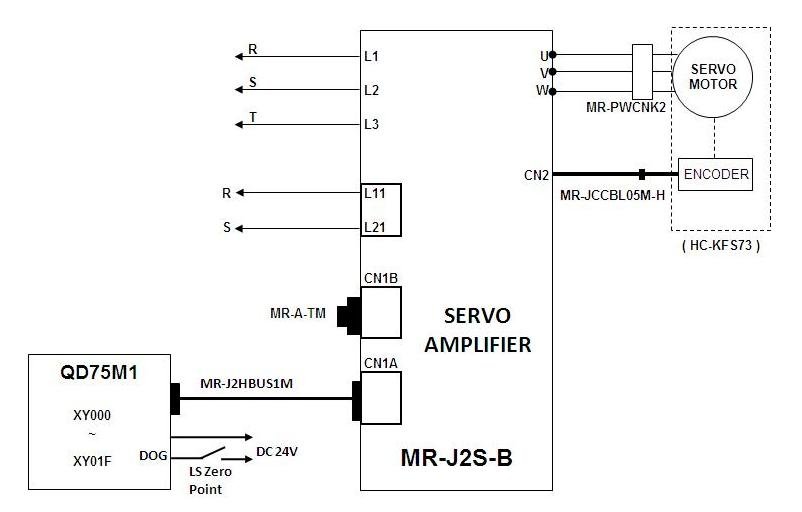
Power Supply and Grounding Best Practices
Servo drives switch high currents at very high frequencies. This creates electrical noise. To contain this, always use a star grounding topology. Ensure that the drive chassis, the motor housing, and the machine frame share a common, low-impedance path to Earth. Never daisy-chain ground wires between drives.
Shielding Control Cables to Prevent EMI
Electromagnetic Interference (EMI) is the enemy of precision. Your motor power cables and encoder feedback cables must be shielded. Crucially, the shield should be clamped to the bare metal of the drive’s backplate (360-degree termination), not just twisted into a “pigtail” wire. This creates a Faraday cage around your signals.
Ensuring Safety with STO (Safe Torque Off) Wiring
Modern drives like the come with STO inputs. This is a hardware-based safety function that cuts power to the motor output stage without removing main power to the drive logic. Wiring this correctly into your safety circuit (E-stop) is mandatory for compliance with safety standards.
Step 2: Establishing Communication with the Motion Controller
Once the drive is powered and safe, it needs to talk to the controller.
Choosing the Right Protocol: EtherCAT, CANopen, or Pulse/Direction
The choice of protocol defines your system architecture.
-
Pulse/Direction: Simple and universal, but limited in feedback data.
-
CANopen: Robust but lower bandwidth.
-
EtherCAT: The standard for high-performance automation. It offers real-time synchronization and simplified wiring. Our are optimized for EtherCAT, allowing for millisecond-level cycle times.
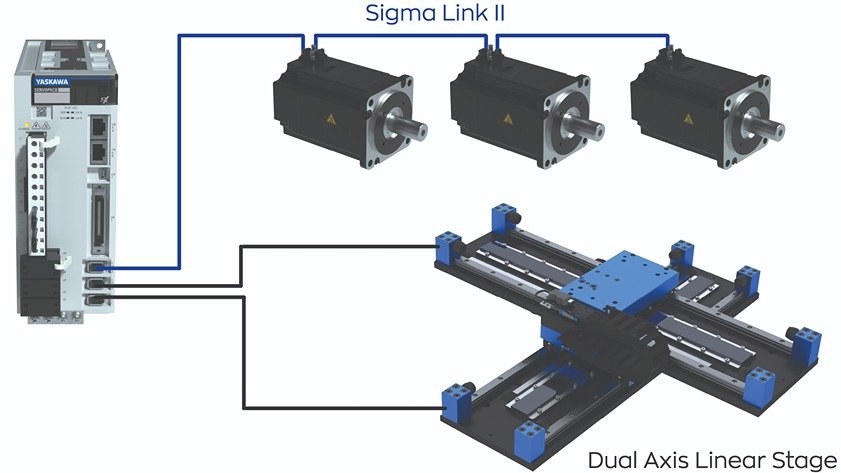
Configuring Station Aliases and Baud Rates
For bus-based systems, each drive must have a unique address (Node ID). Ensure the rotary switches on the drive match the configuration in your PLC project. For EtherCAT, verify that the XML description file (ESI file) provided by the manufacturer is correctly imported into your controller software.
Handshaking Between the Servo Drive and PLC
Before motion can occur, the drive and controller must perform a “handshake.” This typically involves the controller sending an “Enable” command and the drive responding with a “Ready” status. Monitoring the drive’s status word in your PLC code is essential for diagnosing why a system refuses to move.
Step 3: Parameter Configuration and Servo Tuning
With communication established, the drive needs to know what it is controlling.
Setting Basic Motor Parameters (Inertia, Current Limit)
Input the motor’s datasheet values into the drive: rated current, peak current, pole pairs, and maximum speed. Incorrect values here can lead to motor overheating or weak performance.
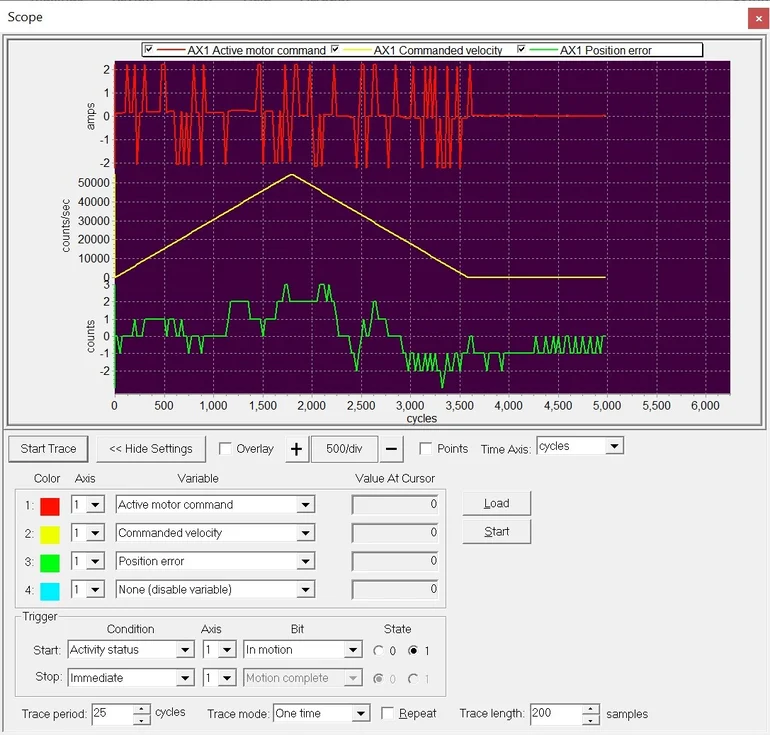
The Basics of PID Tuning for Stability
Servo tuning is the art of adjusting the Proportional (P), Integral (I), and Derivative (D) gains to make the motor follow the command perfectly.
-
High P-gain makes the system stiff and responsive but can cause oscillation.
-
D-gain helps dampen the oscillation.
-
I-gain removes steady-state error but can cause instability if set too high.
Using Auto-Tuning Features on Modern Drives
Fortunately, modern drives like the GSHD series feature advanced “Auto-Tuning” algorithms. These routines inject small movements into the motor to measure the load inertia and automatically calculate the optimal PID gains. For 80% of applications, auto-tuning gets you 95% of the way to perfection.
Common Integration Pitfalls and How to Avoid Them
Even experienced engineers can stumble. Watch out for these common errors.
Mismatched Motor and Drive Capacity
Using a 1kW drive to run a 400W motor is usually fine, but the reverse will result in “Overcurrent” faults. Ensure your drive has sufficient continuous and peak current ratings to match the motor’s demands.
Ignoring Regenerative Energy Handling
When a large load decelerates quickly, the motor acts as a generator, pumping energy back into the drive. If this “regen” energy isn’t dissipated, the drive will trip on “Overvoltage.” For high-inertia vertical axes, you may need an external braking resistor.
Overlooking Mechanical Resonance Issues
Sometimes, a perfectly tuned motor will scream or whine. This is often mechanical resonance—the motor is exciting a natural frequency in the machine frame. Use the drive’s “Notch Filter” parameter to target and suppress this specific frequency without reducing overall system gain.
Conclusion: Seamless Integration Starts with the Right Drive
Choosing a drive designed for ease of integration can significantly reduce your commissioning time. If you have questions about specific parameters or need wiring diagrams for your project, please team. We are here to help you get your automation system moving.
FAQ Section: Servo Integration Questions Answered
Q1: Can I connect a third-party motor to a Hobber servo drive? Generally, yes. Our drives are designed to be universal. However, you must ensure the feedback device (encoder) type matches what the drive supports (e.g., Tamagawa, Nikon, or standard incremental ABZ).
Q2: How long can my encoder cables be before signal loss occurs? For standard TTL incremental encoders, we recommend keeping cables under 20 meters. For serial protocols used in absolute encoders (like SSI or BISS), longer runs up to 50-100 meters are often possible, provided high-quality shielded cables are used.
Q3: What is the difference between position control and torque control modes? In Position Mode, the drive takes step/direction pulses or position targets and manages the path. In Torque Mode, the drive simply outputs a requested force, and the external controller handles the positioning logic. Torque mode is common in tensioning applications.
Q4: My motor is making a high-pitched noise; is this a tuning issue?